Data Governance
Data GovernanceCentral module representing the most senior organizational entity within the catalogue.
Align teams about the meaning of the data they use.
Know what information exists, what it represents and under which rules it is used.
Locate assets and manage who can consult them.
A first look at what you can do with this product.
Know what information assets exist and how they are described.
Share consistent definitions to reduce different interpretations between teams.
Give context to the data with policies and rules that guide its use.
Understand how sources, fields, and business terms are related.
Enter existing definitions and find documented information.
Manage access and refer to the traceability of changes in the catalogue.
Select a category in the map to explore its features.
Choose a category or search across all product features. Browse the results page by page.
166 features
The search includes all categories.
Central module representing the most senior organizational entity within the catalogue.
It allows you to register the data governance instance of the authenticated user organisation.
Allows you to update descriptive attributes of the governance instance (name, description, sector) to keep the organization's information updated in the catalog.
Recovers the active data governance instance of the authenticated user organization, including all its metadata and audit attributes.
Record and update the date on which the last synchronization of the catalog was performed with the external data source manager, allowing tracking the validity of the information.
It presents aggregate metrics on the number of entities registered by type (glossaries, terms, assets, policies, categories, contexts, rules) in the organization.
It displays specific metrics on the amount of assets recorded by type (data sources, dashboards, panels, search engines).
Module that manages the organization's general glossary: a centralized repository of terms with cross-sectional definitions for the entire institution.
It allows you to create the organizational glossary by specifying name and description, and edit it at any time to keep your information up to date.
It allows you to retrieve detailed information from the organizational glossary, including metadata and the list of associated terms for navigation and query.
Module that manages the individual terms of the organizational glossary.
It allows you to add new terms to the organizational glossary by specifying name, alias, description, domain and reference.
Allows you to update the modifiable attributes of a term (name, alias, description) to keep the definition aligned with business reality.
It retrieves detailed information from a specific glossary term, including all its attributes and relationships associated with data and policy assets.
It allows to remove a term from the organizational glossary, delinking it from the data and policy assets to which it was associated.
It offers a paged view of all glossary terms with filtering capacity across multiple fields, facilitating navigation in glossaries with large volumes of...
It allows association and disassociation of organizational terms with data assets, documenting which data sets contain or represent concepts of institutional vocabulary.
It allows to associate and disassociate policies to organizational terms, indicating which rules or data restrictions apply to the use of that term.
Module that manages the categories as classification standard to group and organize the elements of the catalog (business clusters, data assets, rules, standards...
It allows to define new categories with name and description that serve as criteria of classification shared between multiple entities of the catalog.
Allows updating the name, description and attributes of an existing category to keep it aligned with the evolution of the organization's classification framework.
It allows to recover complete information from a category, including glossaries, assets, rules, regulatory rules and contexts that have assigned it.
Removes a category and, in cascade, all business glossaries, business terms, contexts and business rules linked exclusively to it.
It offers a paged view of all available categories, with filters by name, description or other fields.
It allows adding attributes with title, description and value to a category to enrich its descriptive capacity and adapt it to the classification needs of the organization.
It allows linking and delinking a category with multiple types of entities from the catalog, creating a cross-classification network that enriches navigability.
It allows you to add editorial notes and URL references to a category to document its origin, usage criteria or complementary information sources.
Module that manages business glossaries: specialized sets of terms that share a thematic domain and are linked to an organizational category.
It allows you to create a new business glossary associated with a category and the organization's data governance, specifying name and description.
Allows updating the basic metadata of a business glossary (name and description) to keep its definition up to date.
It retrieves complete information from a business glossary, including the business terms it contains, its associated categories and audit metadata.
Removes a business glossary and, in cascade, all business terms and their associated contexts.
It offers a paged view of all the business glossaries of the organization, with filtering capacity by name, category and other fields.
It allows you to associate and disassociate categories to a business glossary, classifying the glossary within the organization's thematic framework.
It allows you to obtain business glossaries that have not yet been linked to a specific entity (for example, to a category), facilitating selection at the time of setting up...
Import glossaries and terms from XLSX files, validate the structure and create or update the corresponding entities.
Allows you to download a preconfigured Excel template with the headers required for massive import of glossaries and terms.
Module that manages business terms: precise and contextualized definitions of the specialized vocabulary of a functional domain.
It allows you to create a new business term linked to a specific glossary, defining name, alias, description, domain and reference.
It allows updating the description and other editable fields of an existing business term to keep its definition in force.
Recover detailed information from a business term, including its context, rules, policies and associated data assets.
It removes a business term from its glossary and disassociates all related entities (contexts, rules, policies, assets).
It offers a paged view of all business terms with filters across multiple fields.
It allows to associate and disassociate categories to a business term, placing it within the classification framework of the organization.
It allows to associate and disassociate organizational policies to a business term, indicating which rules or data restrictions apply to that term.
It allows you to add and remove business rules linked to a term, establishing the logical or mathematical conditions that the term must meet.
It allows you to associate and disassociate data assets to a business term, documenting what data sets contain or represent that business concept.
It allows to obtain the terms of business that have not yet been linked to a specific entity (asset, policy, category), facilitating selection by establishing new...
Module that manages the usage contexts associated with business terms.
It allows you to create a new context with name and description, associated with the organization's data governance.
Allows updating the name and description of an existing context.
It retrieves complete information from a context, including usage examples, reference URLs and business terms that use it.
Removes a context and all its associated elements (examples and URLs).
It offers a paged view of all the contexts available in the organization, with filters by name and description.
Allows you to add and remove usage examples within a context.
Allows you to add and remove reference URLs within a context.
It allows you to add editorial notes to a context to record internal observations, clarifications or comments from catalog managers.
It allows to associate and disassociate categories to a context, placing them within the classification framework of the organization.
Module that manages business rules: formal definitions describing conditions, restrictions or criteria that data must meet.
It allows you to define a new business rule with name, description and, optionally, a mathematical or formal description of the condition it represents.
Allows you to update editable fields of an existing business rule.
Recovers complete information from a rule, including the policy to which it is linked and the business terms that apply it.
It removes a business rule and automatically disconnects all the business terms that referenced it.
It offers a paged view of all the organization's business rules, with filters by name and description.
It allows linking and delinking a rule with categories and contexts, enriching its classification and documenting the scenarios in which it applies.
Module that manages data policies: general provisions that establish restrictions, obligations or guidelines on how data assets should be managed.
It allows to define a new policy with name and description, associated with the organization's data governance.
Allows you to update editable fields of an existing policy.
It retrieves complete information from a policy, including its regulatory rules, business rules and business terms that follow it.
Removes a policy from the organization, automatically delinking all related terms and rules.
It offers a paged view of all the organization's policies, with filters by name and description.
It allows to create, edit, consult and eliminate regulatory rules linked to a policy.
It allows to recover all the business terms associated with a specific policy, facilitating the impact analysis of that policy on the business vocabulary.
It allows you to add editorial notes to a policy and link it with other entities in the catalog (categories, terms) through the relationship system.
It records data sources, dashboards, analytical panels and search engines with their metadata and relationships.
It allows you to register a new data asset or update an existing one using its external identifier as a search key.
Allows updating the name, description and other editable fields of an already registered data asset.
It retrieves complete information from an asset, including its type, schema (fields), metadata in JSON format, linked terms and categories, and related assets.
It allows removing a data asset from the catalog, dissociating all its relationships with associated terms, categories and schemas.
It offers a paged view of all available data assets, with filters by name, type, description, category and governance.
Manages the types of assets available in the catalog, configured at the level of governance of the organization.
It allows you to create and manage the schema of a data asset type data source.
It allows you to create, edit, query and remove individual fields from a data asset scheme.
Allows you to record, edit and view the SQL query or logical expression that defines how the asset information is extracted from its original source.
It allows you to associate and disassociate business terms to a data asset, documenting which concepts of the business glossary are present in that data set.
It allows two-way relationships between data assets to document dependencies, referrals or equivalences between data sets.
It allows to associate and disassociate categories to a data asset, classifying it within the organization's thematic framework.
It allows you to add editorial notes to a data asset to record usage observations, quality warnings or other comments relevant to data consumers.
It allows you to obtain data assets that have not yet been linked to a specific entity (business term, organizational term, category or other asset), facilitating the...
It allows you to search for entities of the catalog using free text, autocompletion, filters and pagination, with language analysis in Spanish.
Allows you to enter a query in natural language to find any catalog entity that matches the searched terms, operating on all text fields...
Optimized search mode to suggest real-time results while the user writes.
It allows you to refine the results by applying filters by type of entity, organization or other attributes, reducing the set of results to those most relevant to the user.
The results are paged by setting limit and scroll (limit/offset), with return of the total matches found.
When an entity is created, modified or deleted from the catalog, the system automatically links the corresponding indexing operation to Solr.
Sets field schemas by entity for text search, with tokenization, timing and treatment of empty words in Spanish.
When selecting a search result, the user is directed to the detail page of the corresponding entity, showing all their information, relationships and metadata.
Cross-sectional module that allows you to add editorial notes to any entity in the catalogue.
It allows you to add a note to any entity in the catalog by specifying title, description and type of note.
Allows you to modify the content (title, description) of an existing note.
Allows removing a note from an entity from the catalog.
Recovers all notes associated with a specific entity in the catalog, supported by filters by type of entity and identifier.
It allows you to obtain all the notes in the catalogue corresponding to a particular type of entity (e.g. all data asset notes), with filters and pagination.
Module that controls access to the data catalog platform.
It allows users to authenticate using user credentials and password.
It allows the user to complete his active session safely, invalidating the current access token.
Interface security component that checks if the organization has an active data governance instance configured before allowing access to sections...
Allows you to create, edit and remove users from the system.
It facilitates the creation, editing, elimination and listing of user groups.
It allows linking and delinking users to specific groups by facilitating the management of collective permits and the organisation of users.
It provides capabilities to create, edit, delete and view organizations.
Allows the process of authentication and deauthentication of users including active session management and session closure.
It provides a list-based access control system (ACL) that allows you to create, edit, delete and list access control objects for specific resources.
It allows you to create and list object types for the access control system by facilitating the categorization and management of permissions.
It generates automatic authentication logs and user actions providing complete traceability of the activities performed in the system.
It allows to consult and visualize authentication logs and actions facilitating the audit and security monitoring of the system.
Robust authentication system with support for multiple identification methods.
Validate user credentials and apply password policies.
Administration of user sessions with expiration time control and automatic renewal.
Integration with external authentication services and corporate user directories.
Granular access control system based on specific roles and permissions.
Administration of user roles with specific permissions for different system functionalities.
Detailed access control to specific resources including data sources files and configurations.
Complete audit system of accesses and actions carried out by users with detailed logging.
It provides capabilities to add edit, delete and list LDAP configurations.
Module that manages user profile information within the catalog and registration of its activities.
Displays authenticated user information (name, role, organization, group) and allows you to view the data associated with your account within the catalog.
It records and presents the history of actions carried out in the organization, including creations, editions and deletions of entities from the catalog.
Information module that exposes the complete list of libraries and open source software dependencies used in the construction of the platform, with their respective...
It presents to the user the list of third party dependencies used in the frontend of the catalog, with name, version and license type of each component.
Module that manages the mandatory initial configuration flow that an organisation must complete before being able to use the data catalog.
It presents a step-by-step flow that guides the administrator in creating the organization's data governance, setting up the basic parameters needed to activate...
Technical module covering the configuration of all services needed to operate the platform in production and development environments.
The backend, frontend, search engine and asynchronous workers are packed in containers.
Manages data persistence and schema changes through versioned migrations.
The catalogue has a full text search engine.
Processes indexing events in the background, with retry and state control.
Secret and credentials management service to protect access keys to external services in production environments.
Centralized management of environment parameters (URLs services, credentials, JWT keys, search engine configuration) using separate .env and .env.example files...
It offers capabilities to monitor and record system activities by facilitating auditing, troubleshooting and operation tracking.
It provides access to user-specific logs including authentication activities, queries and data changes.
Comprehensive monitoring system for performance and status of all components of the system.
Collection and analysis of performance metrics including CPU storage and network memory.
Graphical interfaces for real-time display of metrics and system status.
Automatic maintenance system with scheduled tasks and resource cleaning.
Automatic processes of cleaning obsolete log temporary files and expired data.
Automatic database maintenance including record cleaning and index optimization.
System of automatic updates of components and dependencies with version control.
Real-time monitoring of the status of download tasks including progress running time processed records and error management.
State control system for download tasks including states such as "tail" "executing" "completed" "error" and "cancelled" with controlled interstate transitions.
Data validation system and information processing utilities.
Input parameter validation system including verification of required data types fields and validation of at least one mandatory parameter.
It offers detailed security logs including authentication attempts, permit changes and administrative audit activities.
It records all actions taken by users in the system providing complete traceability of operations.
Distributed processing system for high performance and scalability tasks.
Automatic load distribution between multiple workers to optimize performance.
Ability to scale horizontally by adding additional workers according to demand.
Robust fault tolerance system with automatic recovery and task redistribution.
We didn't find features with those terms. Try a different word.
Explore how it relates to other products and shared capabilities.
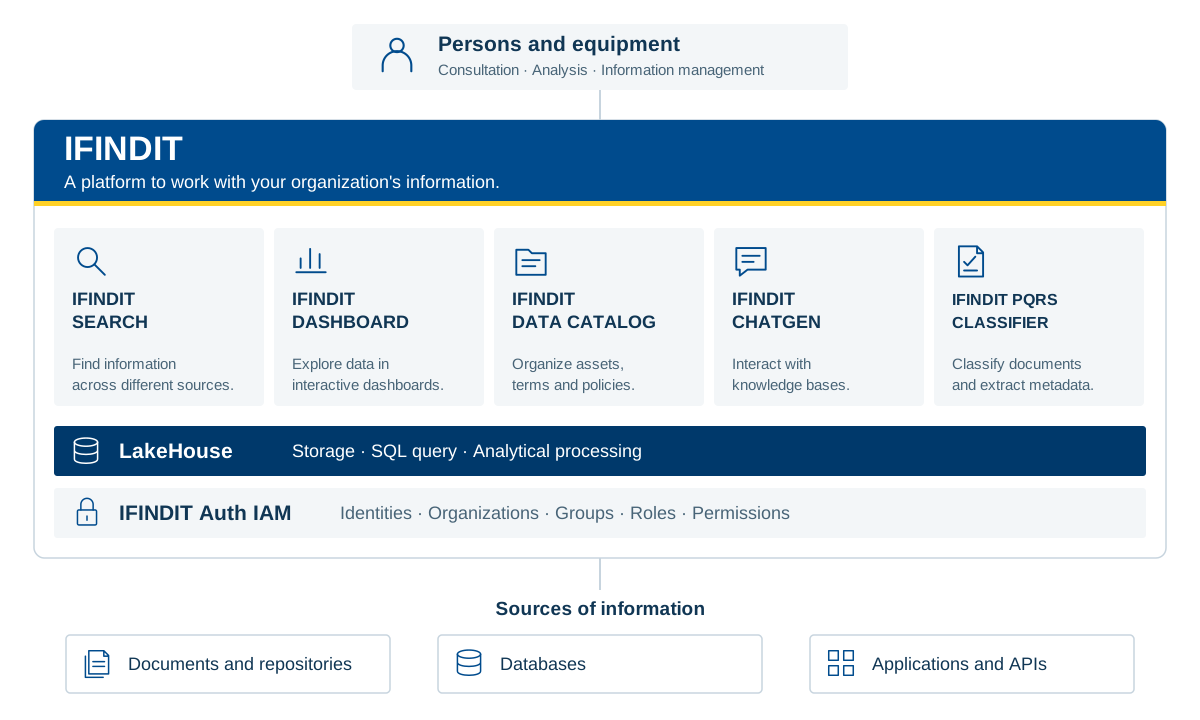
Consultation · Analysis · Information management
Documents and Repositories · Databases · Applications and APIs
A functional view of IFINDIT and its shared capabilities. Each product connects different needs of the organization.
View platform architecture (SVG)Tell us what you need to find, analyze or organize. Discover IFINDIT with the Creangel team.