Real-time Transmission Conversation (SSE)
Artificial Intelligence Chat (Real Time)The user receives the answers of artificial intelligence letter to letter, progressively and fluidly, without having to wait until the complete answer is ready for...
Help teams to get answers from the knowledge of the organization.
Accompany tasks with wizards connected to their sources and tools.
Take access to knowledge to the channels and languages used by your teams.
A first look at what you can do with this product.
Refer to documented knowledge through responses based on available sources.
Accompany tasks with attendees who can consult information and use connected tools.
Adapt each conversation experience to the context and needs of your users.
Keep the thread of the conversation to give continuity to each query.
Attend interactions in more channels, by voice and in different languages.
Control the access, use and activity of attendees.
Select a category in the map to explore its features.
Choose a category or search across all product features. Browse the results page by page.
103 features
The search includes all categories.
The user receives the answers of artificial intelligence letter to letter, progressively and fluidly, without having to wait until the complete answer is ready for...
While AI prepares its response, the system displays progress messages that inform the user at what stage the process is at.
Each user message and each AI response are automatically saved in the conversation history to maintain context.
In cases where real-time transmission is not adequate, the system can deliver the full response at one time.
The system can automatically generate suggestions for questions related to the topic of the conversation, helping the user to continue the dialogue.
Special query mode that combines semantic search and generative response to offer direct results to specific questions.
The smart search box can also generate suggestions for related queries in real time.
The system verifies that the conversation exists and is active before processing any message, avoiding errors due to invalid or closed conversations.
The system automatically checks that the widget type and AI settings are supported before starting any conversation.
The system verifies that applications come from authorized origins, blocking accesses from unauthorised sites.
Basic type of agent that processes the user query and generates a direct response using the configured language model.
It combines the processing of queries with the use of tools using a ReAct agent.
Agent who first elaborates a plan of steps to resolve the query and then executes them in order, ideal for complex multi-stage tasks.
It includes a type of consultation-oriented agent that requires pre-response reasoning.
The complex tasks of the agents are processed in the background without blocking the user interface, which receives a notification when they finish.
Send agents' tasks to a Kafka tail for asynchronous processing.
Each task assigned to an agent is recorded with a unique identifier that allows monitoring of its status (pending, in process, completed).
The agent's type and behavior is automatically determined according to the settings of the chat widget, without requiring manual adjustments per session.
Agents can automatically consult the knowledge base to find relevant information to support their responses.
Allows agents to use a mathematical calculation tool.
Agents can connect to external MCP servers to access additional functionalities and data in a standardized manner.
Each time an agent uses a tool, the call is recorded with its parameters and result for audit and traceability.
The system is designed to add new tools without modifying the main code of agents, using a common base interface.
The administrator can create, edit and delete tools available to agents from the management interface.
The system can be connected as a client to external MCP servers to request additional capabilities in a standardized manner.
The system can communicate with MCP servers operating through standard input/output, using an HTTP bridge as an intermediary.
The administrator can register, edit and delete the MCP servers that agents can use.
The system searches for relevant documents not by exact words, but by the meaning of the query, finding related information even if it does not use the same words.
After the semantic search, the system applies a second relevance filter that reorders the documents found to prioritize the most useful ones for the response.
It generates responses from documents recovered from a knowledge base using RAG.
Each chat widget can have its own RAG settings, pointing to different knowledge bases depending on the case of use.
The administrator can create, edit and remove RAG settings from the management panel.
The administrator can create document repositories that agents and AI will use as a source of information to respond.
The documents of the knowledge base are organized into special collections that allow searches by meaning in an efficient manner.
The system uses ChromaDB as a vector storage engine, which allows searching for documents by semantic similarity.
Stores knowledge base files in MinIO, compatible with S3 object storage.
The administrator can create, configure and remove the available vector stores for knowledge bases.
The administrator can register and configure different language models (LLM) that chatbots can use.
Each chatbot can be configured to use a specific language model, allowing you to optimize costs and capabilities.
The system records how many tokens (text units) consume each conversation, allowing control of LLM usage costs.
The system can temporarily store frequent responses from the language model to deliver them faster without generating them again.
The administrator can configure whether and how the answers of each language model are cached.
Use Redis to store and retrieve cached responses.
The administrator can create and edit the basic instructions that guide AI behavior in each chatbot.
It allows you to configure how system prompts are built and combined with user messages.
The administrator can define predefined response formats that AI can use to structure their responses consistently.
The system automatically cleans the history of AI before sending it as context, eliminating technical labels or noise that could confuse the model.
The system can automatically improve the user query before processing it, making it clearer and more complete for the model.
The administrator can create settings that define the complete behavior of a chatbot: type of AI, model, prompts, tools and more.
The system supports two main chatbot modes: RAG (responds based on documents) and Agent (use tools and reasoning to solve tasks).
It allows you to create and manage chat widgets for insertion into websites and applications.
Interactive conversation Widget that allows users to chat with AI naturally.
The administrator can test the operation of a widget directly from the management panel before publishing it.
The administrator can define from which websites each widget can be used, blocking unauthorized accesses.
The system has compatibility rules that determine which AI settings are valid for each widget type.
When starting, the system automatically loads the default compatibility rules if they do not already exist.
Each widget can be configured with a welcome message displayed to the user at the start of the conversation.
The administrator can configure which types of input the widget accepts: text, voice, files, etc.
Users can start new chatbot conversations from the widget or management interface.
The system saves the complete history of each conversation, allowing you to return to the thread of dialogue in future sessions.
The system maintains and manages the context of the conversation so that AI remembers what has been said above.
The system can automatically detect the language in which the user writes and adapt the response to the same language.
Supports non-Login conversations and manages temporary identifiers for those users.
The administrator can configure how many previous messages are included as context for each new AI response.
The system can automatically detect and filter messages with inappropriate language or offensive content before processing them.
The administrator can configure the words and patterns that will activate the content filter.
When a message is filtered, the system can respond with a custom message instead of ignoring the request.
The administrator can record relational databases (such as PostgreSQL) that agents can consult for structured information.
It allows you to configure which database tables are accessible to agents.
It allows to define which columns of each table are visible and queryable by the agents.
Agents can consult relational databases for structured information to support their responses.
The system can convert voice or audio messages into text to process them as queries to the chatbot.
The system can automatically translate user messages or AI responses into different languages.
The system has a dedicated service that receives messages from WhatsApp and sends them to the processing queue of the chatbot.
The system exposes a connection point (webhook) that WhatsApp uses to send users' messages.
Messages received by WhatsApp are automatically processed and answered by artificial intelligence.
After processing the user message, the system sends the response back to the user via WhatsApp.
The administrator can create and manage access keys that allow external applications to connect to the chat service.
It supports several organizations with data separation and tenant configuration.
The administrator can create and manage organizations that use the chat platform.
Sensitive credentials and data stored in the database are automatically encrypted to protect them.
The system distinguishes between routes requiring authentication and accessible public routes without credentials, such as the endpoint of the chat widget.
Send intensive processing tasks to Apache Kafka to run in the background.
An independent service continuously reads the tail tasks and executes them in the background.
Directs tasks that fail to a queue of failed messages for review.
A dedicated service processes the change events in the database to keep the different system components synchronized.
Transforms and applies the events received from the database, running the necessary operations in response to changes.
The consumer service can be recharged hot without needing to restart the entire system when the configuration changes.
The system includes a planner that executes automatic tasks in predefined times, without manual intervention.
The administrator can define which tasks are executed automatically and how often.
The planner operates independently to the main server.
Interface to create, edit and manage chatbot settings, including model, prompts and tools.
Interface to create, configure, test and publish chat widgets that are inserted into websites.
Interface to manage the databases of documents that feed the chatbot responses.
Interface to record and manage relational databases and vector warehouses connected to the system.
Interface to view and manage the conversation history of all users.
Interface to review activity records, errors and system usage.
Interface to record and configure available language models for chatbots.
Dedicated page on the panel where the administrator can test the chat widget in real time before posting it.
The backend is organized into independent functional domains: LLM engine, chat manager, widgets and identity, facilitating the development and independent maintenance of each...
The API supports multiple organizations and separates their data and settings per tenant.
In production, the system uses Gunicorn as a high-capacity web server, with customizable configuration of workers.
It allows you to deploy services through Docker and Docker Compose.
We didn't find features with those terms. Try a different word.
Explore how it relates to other products and shared capabilities.
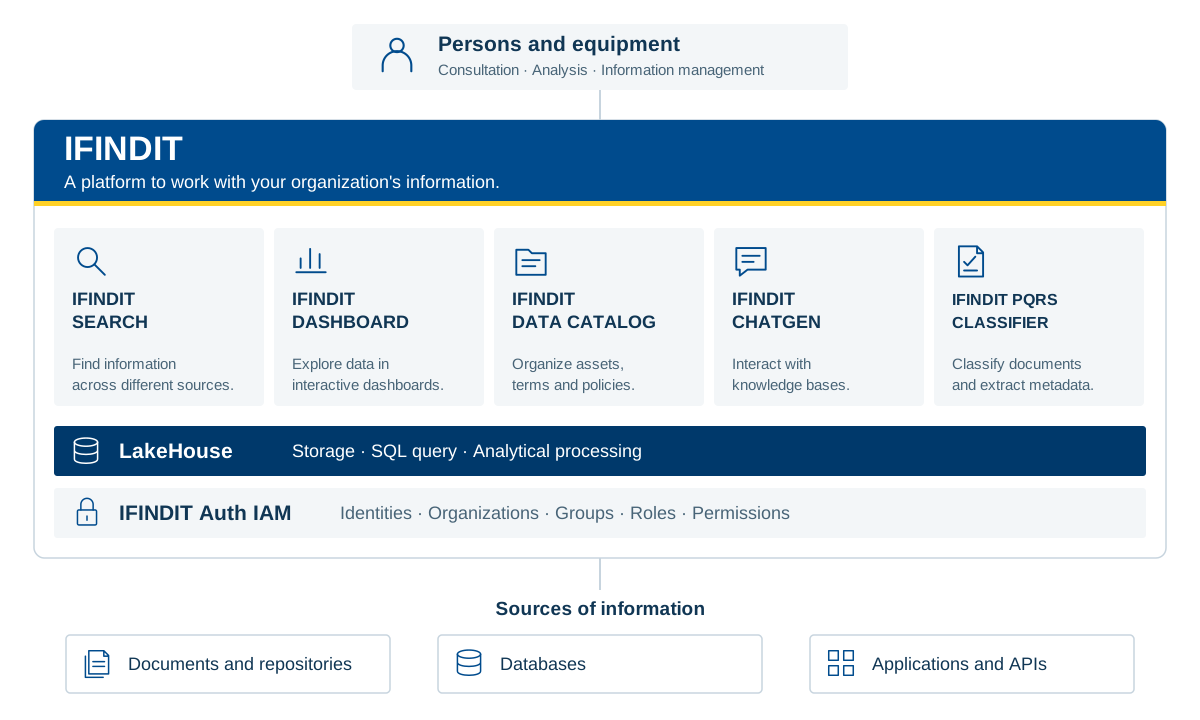
Consultation · Analysis · Information management
Documents and Repositories · Databases · Applications and APIs
A functional view of IFINDIT and its shared capabilities. Each product connects different needs of the organization.
View platform architecture (SVG)Tell us what you need to find, analyze or organize. Discover IFINDIT with the Creangel team.